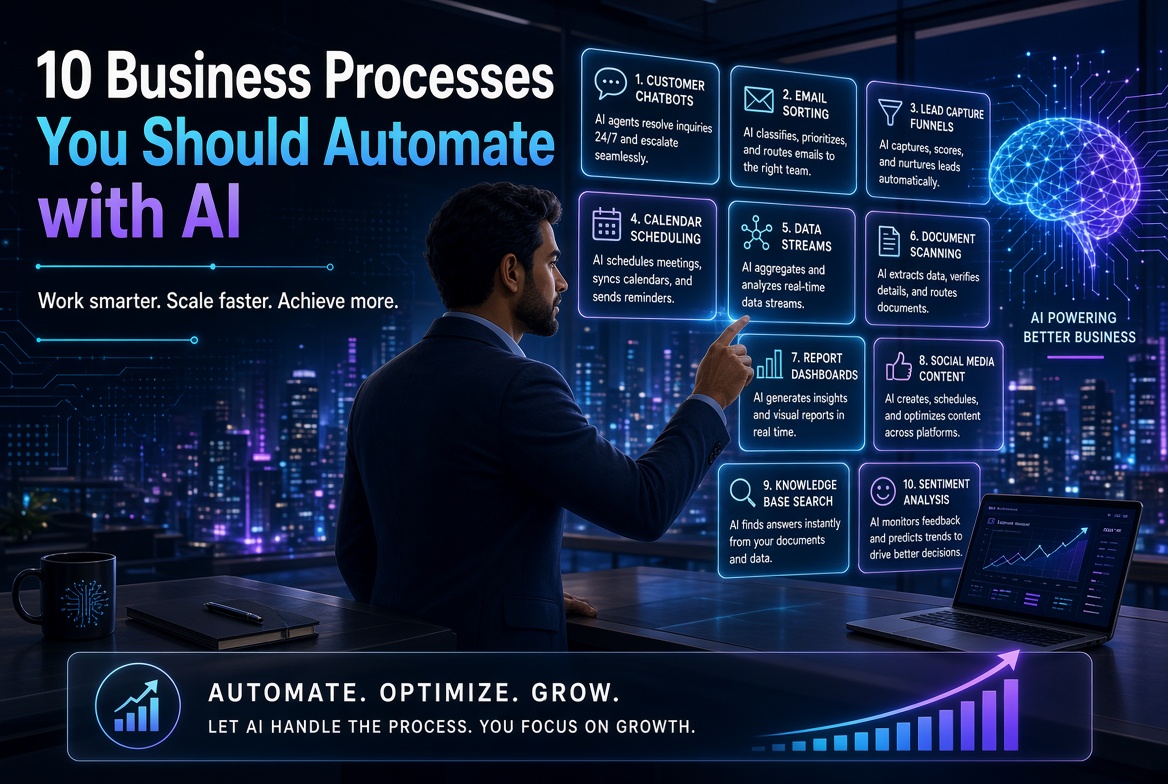
10 Business Processes You Should Automate with AI
AI automation is transforming how businesses handle repetitive and time-consuming work. Instead of spending valuable hours on routine administrative tasks, businesses can use AI and automation tools to improve efficiency, reduce errors, respond faster, and allow employees to focus on higher-value activities. This article explores 10 business processes that can be automated or enhanced with AI, including customer enquiries, lead capture and follow-up, email management, appointment scheduling, data entry, document processing, report generation, marketing workflows, internal knowledge support, and customer-feedback analysis. The article also presents a practical five-step AI automation framework: Identify, Document, Simplify, Automate, and Monitor. Businesses are encouraged to start with one repetitive process, measure the current cost and time involved, introduce automation carefully, and monitor the results before expanding. The key message is that businesses should not automate simply because technology makes it possible. The best approach is to automate routine tasks while preserving human judgment for complex, sensitive, and high-impact decisions. AI automation is not about replacing people—it is about helping people spend less time on repetitive work and more time creating value.
Running a business involves much more than selling a product or delivering a service.
Every day, business owners and their employees spend valuable time responding to emails, entering data, following up with customers, preparing reports, scheduling meetings, creating content, processing documents, and performing other repetitive tasks.
Many of these activities are necessary—but they don't always need to be done manually.
Artificial intelligence and automation can help businesses reduce repetitive work, improve consistency, respond faster, and give employees more time to focus on higher-value activities.
The goal is not to automate everything.
The goal is to identify processes where AI and automation can produce a meaningful improvement without sacrificing quality, security, or human judgment.
Here are 10 business processes you should consider automating with AI.
1. Customer Enquiries and Frequently Asked Questions
One of the easiest places to introduce AI automation is customer service.
Businesses receive many questions repeatedly:
• What are your opening hours?
• How much does this product cost?
• Where are you located?
• How do I place an order?
• What payment methods do you accept?
• How long does delivery take?
• How do I book an appointment?
• What is your return policy?
Answering the same questions repeatedly consumes employee time.
An AI-powered customer-service workflow can help provide immediate responses to common questions.
How it can work
A customer sends a message through your website or another supported channel.
The system:
1. Identifies the customer's question.
2. Searches an approved knowledge base.
3. Provides an appropriate response.
4. Collects additional information if necessary.
5. Escalates complicated issues to a human employee.
The important principle
AI should not be allowed to invent company policies or make unsupported promises.
Give the system access to approved information and establish clear rules for when a human must take over.
2. Lead Capture and Follow-Up
A potential customer who makes an enquiry today may not be ready to buy immediately.
Unfortunately, many businesses lose leads simply because nobody follows up consistently.
AI automation can help organize this process.
For example:
Website enquiry
↓
Customer information captured
↓
Lead categorized
↓
Personalized response sent
↓
Follow-up scheduled
↓
Sales representative notified
↓
Lead status updated
This can significantly reduce the number of leads that disappear because someone forgot to follow up.
Example
Imagine a training company receives 100 enquiries for a professional course.
Instead of manually responding to every enquiry, an automated workflow can:
• Capture the person's name and contact information.
• Identify the course they are interested in.
• Send relevant information.
• Answer common questions.
• Record the lead.
• Schedule a follow-up.
• Alert a salesperson when the lead shows strong interest.
The salesperson can then focus on conversations that require human attention.
3. Email Management
Email can consume several hours every week.
Businesses receive:
• Customer enquiries
• Supplier messages
• Meeting requests
• Complaints
• Invoices
• Reports
• Internal communications
• Marketing messages
AI can help classify, summarize, draft, and prioritize emails.
Possible workflow
AI can categorize incoming messages as:
Urgent
Customer
Sales
Finance
Internal
Newsletter
Low priority
The system can then recommend actions or prepare draft responses.
For example:
"Customer is requesting an update on an outstanding order."
The AI could prepare a response using approved company information.
A human can review the response before sending it.
Remember
Automated email responses should be carefully controlled.
Sensitive, legal, financial, employment, or high-risk communications may require human review.
4. Appointment Scheduling
Scheduling appointments is another repetitive administrative task.
A business may spend time:
• Checking availability
• Responding to appointment requests
• Sending confirmations
• Rescheduling appointments
• Sending reminders
• Updating calendars
Automation can simplify this entire process.
Example
A customer asks:
"Can I meet the consultant next Tuesday?"
The system can check the approved calendar, identify available times, offer options, confirm the selected appointment, and send a reminder.
This can be particularly useful for:
• Consultants
• Clinics
• Salons
• Training companies
• Lawyers
• Financial advisers
• Real-estate businesses
• Educational institutions
• Service providers
The exact workflow should be adapted to the organization's privacy, regulatory, and operational requirements.
5. Data Entry and Information Transfer
Data entry is one of the most obvious areas for automation.
Businesses often move information between:
• Emails
• Forms
• Spreadsheets
• Databases
• Accounting systems
• CRM systems
• Inventory systems
• Project-management platforms
Manually copying information from one system to another creates unnecessary work and increases the possibility of errors.
Example
A customer completes an online form.
Instead of an employee manually copying the information into a spreadsheet and CRM, an automated workflow can:
1. Receive the form.
2. Extract the relevant information.
3. Validate required fields.
4. Add the customer to the CRM.
5. Update the spreadsheet.
6. Notify the appropriate employee.
7. Trigger a welcome email.
AI can be particularly useful when the information arrives in an unstructured form, such as an email or document.
6. Document Processing
Businesses deal with enormous numbers of documents.
Examples include:
• Invoices
• Receipts
• Contracts
• Application forms
• Purchase orders
• CVs
• Reports
• Research papers
• Customer documents
• Delivery notes
AI can help extract important information from these documents and organize it for further processing.
Example: Invoice Processing
Suppose a company receives 200 invoices every month.
A document-processing workflow could:
1. Receive the invoice.
2. Extract the supplier name.
3. Extract the invoice number.
4. Identify the date.
5. Extract the amount.
6. Identify relevant fields.
7. Send the information to an accounting workflow.
8. Flag unusual or incomplete information for human review.
This can reduce repetitive administrative work.
But be careful
Documents can contain sensitive information.
Businesses should consider privacy, security, access controls, retention policies, and applicable laws before sending confidential documents to an AI service.
7. Report Generation
Many organizations spend significant time preparing routine reports.
Examples include:
• Weekly sales reports
• Monthly financial summaries
• Marketing reports
• Inventory reports
• Customer-service reports
• Project-status reports
• Management dashboards
• Performance summaries
AI can help transform structured data into readable summaries.
Example
Instead of manually reviewing a spreadsheet every Friday, a business could have an automated workflow that produces:
Weekly Sales Summary
• Total sales
• Number of orders
• Highest-selling products
• Sales by location
• Change from previous period
• Outstanding issues
• Items requiring management attention
The manager can then review the report rather than spending hours creating it.
The human still matters
AI-generated reports should be checked against the underlying data.
A polished report is not necessarily an accurate report.
8. Social Media and Marketing Workflows
Marketing requires consistency.
Businesses may need to create:
• Social media posts
• Email campaigns
• Blog articles
• Product descriptions
• Advertisements
• Video scripts
• Newsletters
• Promotional messages
AI can help accelerate the process.
Example content workflow
A business provides information about a new product.
AI can help create:
Product information
↓
Blog article
↓
LinkedIn post
↓
Facebook post
↓
Instagram caption
↓
Email newsletter
↓
Short-video script
Instead of creating every piece from scratch, the business can develop one strong source of information and repurpose it.
Don't automate your personality away
The strongest business communication still needs human judgment.
AI should help you communicate more efficiently—not make your business sound like every other AI-generated company.
9. Internal Knowledge and Employee Support
As businesses grow, employees repeatedly ask the same questions.
For example:
• Where can I find the company policy?
• How do I request leave?
• What is the procedure for submitting an expense?
• What are our customer-service guidelines?
• Where is the latest product documentation?
• How do I complete this process?
An AI knowledge assistant can help employees find answers from approved internal documents.
Example
An employee asks:
"What is the procedure for submitting a travel expense?"
The AI searches the company's approved documentation and provides the relevant procedure.
If it cannot find an answer, it should say so and direct the employee to the appropriate person.
Why this matters
A well-organized internal knowledge system can help employees spend less time searching through:
• PDFs
• Emails
• Shared folders
• Manuals
• Policy documents
• Training materials
and more time doing their actual work.
10. Customer Feedback and Sentiment Analysis
Businesses receive customer feedback from many sources:
• Surveys
• Reviews
• Emails
• Social media
• Support tickets
• Online forms
• Interviews
Reading thousands of comments manually can be difficult.
AI can help categorize feedback and identify recurring themes.
Example
Suppose a restaurant receives 2,000 customer comments.
AI could help classify them into themes such as:
Food quality
Service
Waiting time
Pricing
Cleanliness
Staff behaviour
Delivery
Management can then examine the underlying comments and identify areas that require attention.
Important caution
AI classifications are not automatically correct.
Businesses should periodically review samples of the results, particularly when decisions based on the analysis could significantly affect customers or employees.
The 5-Step AI Automation Framework
Before automating a business process, don't immediately open an AI tool.
First understand the process.
A useful framework is:
Step 1: Identify
Find repetitive tasks that consume significant time.
Ask:
"What do we do repeatedly every day or every week?"
Step 2: Document
Write down exactly how the process currently works.
For example:
Customer enquiry
→ Employee reads email
→ Checks customer information
→ Searches product details
→ Writes response
→ Updates CRM
→ Schedules follow-up
Once the process is visible, automation opportunities become easier to identify.
Step 3: Simplify
Don't automate a bad process.
First ask:
"Can we eliminate unnecessary steps?"
Sometimes the best automation is removing a task entirely.
Step 4: Automate
Choose appropriate tools and build the workflow.
Depending on the situation, this might involve:
• AI assistants
• Workflow automation platforms
• CRM systems
• Spreadsheets
• APIs
• Chatbots
• Document-processing systems
• Databases
• Business applications
Step 5: Monitor
Automation does not mean "set it and forget it."
Monitor:
• Accuracy
• Errors
• Customer satisfaction
• Processing time
• Costs
• Security
• Exceptions
Create clear escalation rules for situations that require human intervention.
What Should You NOT Automate Completely?
Not every business process should be fully automated.
Be especially cautious with decisions involving:
• Significant financial consequences
• Legal matters
• Employment decisions
• Medical decisions
• Safety
• Sensitive personal information
• Customer complaints requiring judgment
• Complex negotiations
• High-value transactions
AI can assist with these processes, but human oversight may remain essential.
A useful principle is:
Automate the routine. Augment the human. Escalate the exceptional.
AI Automation Tools to Explore
The right technology depends on your business and workflow.
Tools and platforms commonly used for AI-assisted workflows include:
• ChatGPT
• Google Gemini
• Claude
• Microsoft Copilot
• Zapier
• Make
• n8n
• CRM automation tools
• Google Workspace
• Microsoft 365
• AI APIs
• Document-processing platforms
• Business intelligence and analytics tools
You do not need to use all of them.
Start with the business problem and then choose the technology.
How Much Time Can AI Automation Save?
The answer depends on the process.
Consider a simple example.
Suppose five employees each spend one hour per day performing a repetitive administrative task.
That's:
5 employees × 1 hour × 5 days = 25 hours per week
Over approximately four weeks:
25 × 4 = 100 hours per month
If automation can safely reduce a substantial portion of that workload, the organization could redirect significant employee time toward activities that require human judgment, customer interaction, creativity, sales, analysis, or strategic thinking.
The goal isn't necessarily to eliminate employees.
The goal can be to eliminate unnecessary repetitive work.
Start Small: Automate One Process First
One of the biggest mistakes businesses make is trying to automate everything at once.
Don't.
Choose one process.
For example:
"We spend too much time responding to routine customer enquiries."
Map the process.
Identify the repetitive steps.
Design an AI-assisted workflow.
Test it with a small group.
Measure the results.
Fix problems.
Then expand.
Once the first automation works, move to the next process.
A Simple AI Automation Audit
Take a sheet of paper and list your major business processes.
For each process, ask:
Question Answer
Is this task repetitive? Yes/No
Does it happen frequently? Yes/No
Does it consume significant time? Yes/No
Does it follow predictable rules? Yes/No
Does it involve structured information? Yes/No
Could AI assist with part of it? Yes/No
Does it require human judgment? Yes/No
What happens if AI makes a mistake? Low/Medium/High
Processes with high repetition, predictable steps, and relatively manageable risks are often good candidates for initial automation.
The Future of AI Automation
The next stage of business automation is not simply about chatbots.
Businesses are increasingly moving toward AI-assisted workflows in which different systems work together.
Imagine this:
A customer submits an enquiry.
The system understands the request.
It checks the customer database.
It retrieves relevant information.
It drafts a personalized response.
It updates the CRM.
It schedules a follow-up.
It generates a task for the sales team.
At the end of the week, the system summarizes the results for management.
This is more than an AI chatbot.
It is an AI-powered business workflow.
Final Thoughts
AI automation can help businesses save time, improve consistency, respond faster, and make better use of their employees' skills.
The biggest opportunity is not to automate tasks simply because automation is fashionable.
It is to identify work that is:
• Repetitive
• Time-consuming
• Predictable
• Rule-based
• Data-intensive
and determine whether AI can safely handle some or all of it.
The 10 areas discussed in this article are a good starting point:
1. Customer enquiries
2. Lead capture and follow-up
3. Email management
4. Appointment scheduling
5. Data entry
6. Document processing
7. Report generation
8. Marketing workflows
9. Internal knowledge support
10. Customer feedback analysis
Start with one process.
Measure the current time and cost.
Automate carefully.
Monitor the results.
Then scale.
The future of business is not necessarily humans versus AI. It is increasingly humans working with AI to accomplish more.
Want to Build an AI-Powered Business?
If you are a small-business owner or entrepreneur who wants to use AI for marketing, automation, sales, and customer service, Solo CEO Blueprint provides a practical starting point.
You can also explore AI Mind Coach for practical approaches to using AI to improve productivity and develop smarter working habits.
For readers interested in building AI solutions without extensive programming, No-Code Machine Learning explores tools and approaches for creating AI applications without traditional coding.
Adamschrisco — Learn | Build | Grow.
The goal is not to automate your business simply because you can.
Automate what should be automated, preserve what requires human judgment, and use the time you save to build something more valuable.
Back to Blog
Comments
Be the first to comment.